
Coding interview practice for the interview you actually have
Tsenta's coding interview practice has 3,400+ problems in Tsenta's own words, drawn from public, community-kept lists of the questions 650+ companies ask, to solve in eight languages plus SQL and check against hidden tests. When Tsenta reads a software engineering or data science technical round from your job email, at a company in its coding index, it points you to that company's list first.
Coding is one of five sections of the Interview tab, tagged Beta, in the Tsenta dashboard on the web. Tsenta shows it to people in tech roles, based on the roles you search for and apply to, your interviews and your résumé. The same agent that finds roles, tailors your résumé, applies and tracks replies also reads your interviews from your job email, so your practice can start with the company you meet next.
- 3,400+
- interview problems
- 650+
- companies' question lists
- Eight
- languages plus SQL
- Debug
- a step-through debugger in every one of the eight
From the interview email to an accepted submit
- Step 1
Tsenta finds the round
Connect your job email and Tsenta adds the interview to My interviews, or you add it yourself.
- Step 2
Open that company's list
For a software engineering or data science technical round at a company in Tsenta's coding index, press Coding questions on the round's card, or follow Next up in Coding. You can also open any company's list from the Companies view.
- Step 3
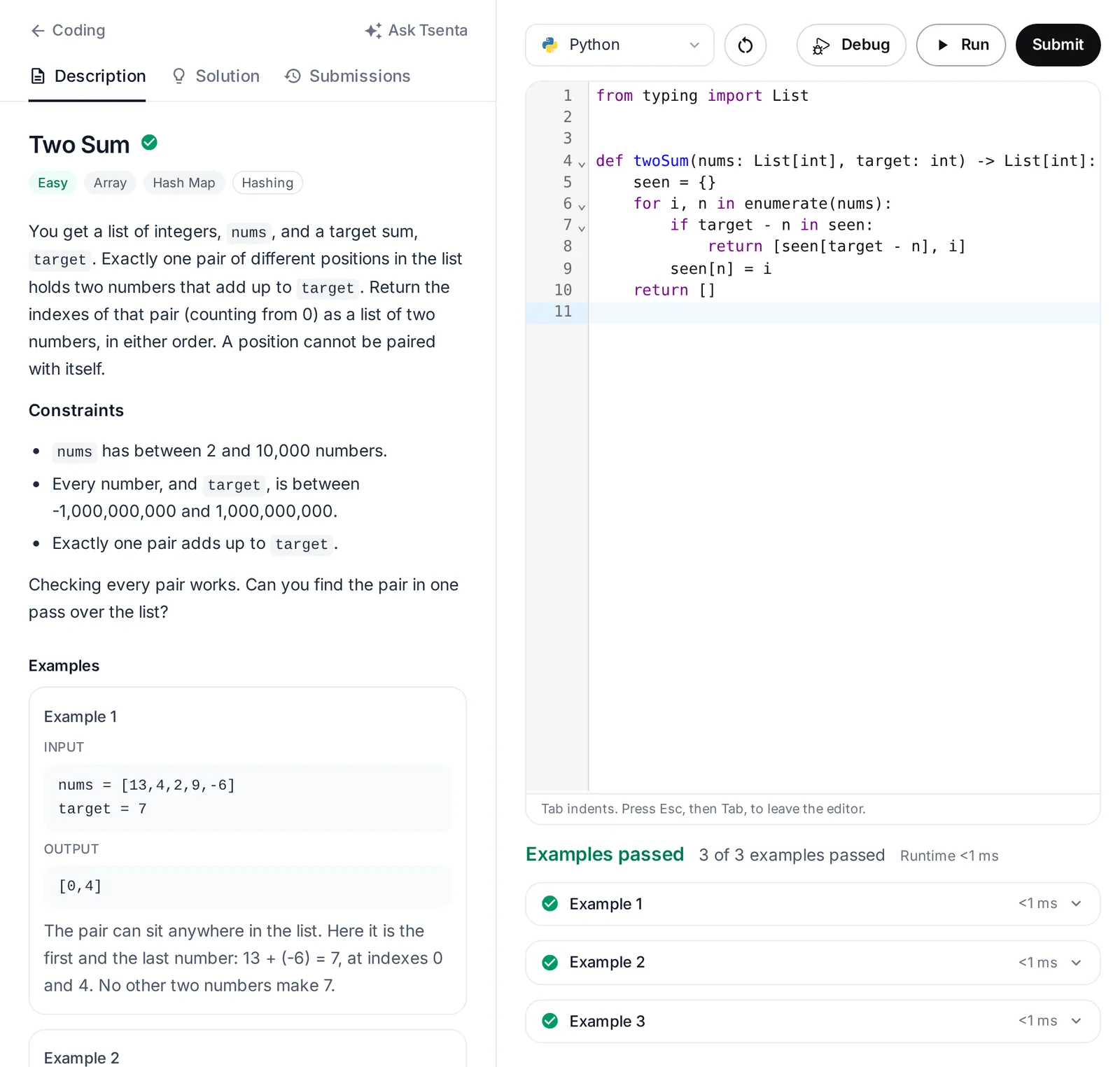
Write it, Run it, Submit it
Write in the language you will interview in and press Run until the examples pass. Then press Submit, which adds the hidden tests.
- Step 4
Review and go again
Open the Solution tab when you want the editorial, load a recent submit from Submissions, or step through an example with Debug, which works in all eight languages. A problem shows as solved once you have an accepted submit.
Coding interview prep for your next technical round
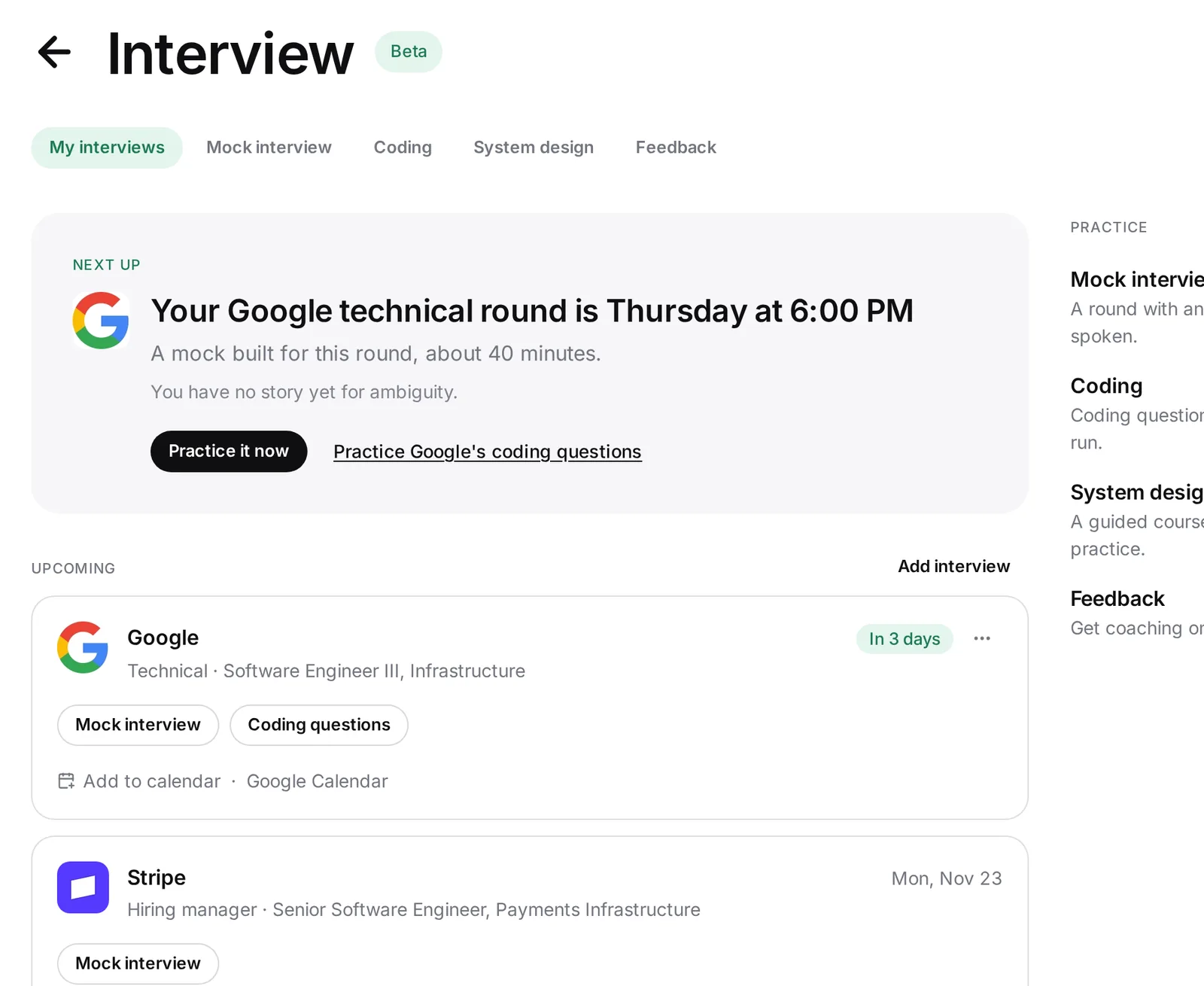
Each interview in My interviews gets a card with the company, role, round and when, whether Tsenta read it from your job email or you added it by hand. Before the round, Mock interview on the card opens a mock built for it. A technical round for a software engineering or data science role, at a company in Tsenta's coding index, also gets Coding questions, which opens that company's list. After the round, Add transcript on the same card starts feedback on the real interview.
Next up, at the top of My interviews, says the one thing to do next, such as "Your Google technical round is Wednesday at 6:00 PM" with Practice it now. When Next up is about a technical round, you are in a tech role and the company is in Tsenta's coding index, it also links to that company's coding questions. In Coding, Next up points at your soonest technical round's company questions, so you start with the list you need first.
Company-wise coding interview questions, most asked first
The 3,400+ problems are drawn from public, community-kept lists of the questions companies ask, covering 650+ companies, and Tsenta writes every one in its own words. Those lists make up Tsenta's coding index, and they are not an official question bank from any employer. Each company's list is sorted by how often each question is asked, with recently asked ones marked.
When your round is days away, start at the top of that company's list and work down. For Google, Amazon, Meta, Microsoft and Uber, Tsenta also has a page on what the questions linked to that company on public lists test, by difficulty, topic and pattern.
Search coding problems by topic, pattern and company
One search box covers problem titles, the words in each statement, topics and patterns. Filters narrow the results by difficulty, 26 topics, 52 patterns and company.
Topics are what a problem is about, such as arrays, hash maps, trees or SQL. Patterns are the techniques that solve it, such as two pointers, a sliding window or dynamic programming. Pick one pattern and work it across companies, or pick one company and work through its list.
- Problems
- Every problem, with the search box and the filters, and the ones you have solved marked.
- Companies
- Each company's list, with the companies of your upcoming interviews pinned first.
- All questions
- Every company's questions, searched together.
Practice coding interview questions online in eight languages plus SQL
Write your solution in Python, JavaScript, TypeScript, Java, C++, C#, Go or Rust. SQL problems take a query instead, so SQL interview practice sits in the same list as the algorithm problems. Starter code follows the usual interview conventions, so a typical solution pastes in.
Run checks your code against the examples. Submit runs every case, hidden tests included, and shows each case's result: accepted, wrong answer, runtime error, compile error, time limit or memory limit. Your code runs in an isolated sandbox with no network access, not in your browser.
Step through your code in any of the eight languages, then read the editorial
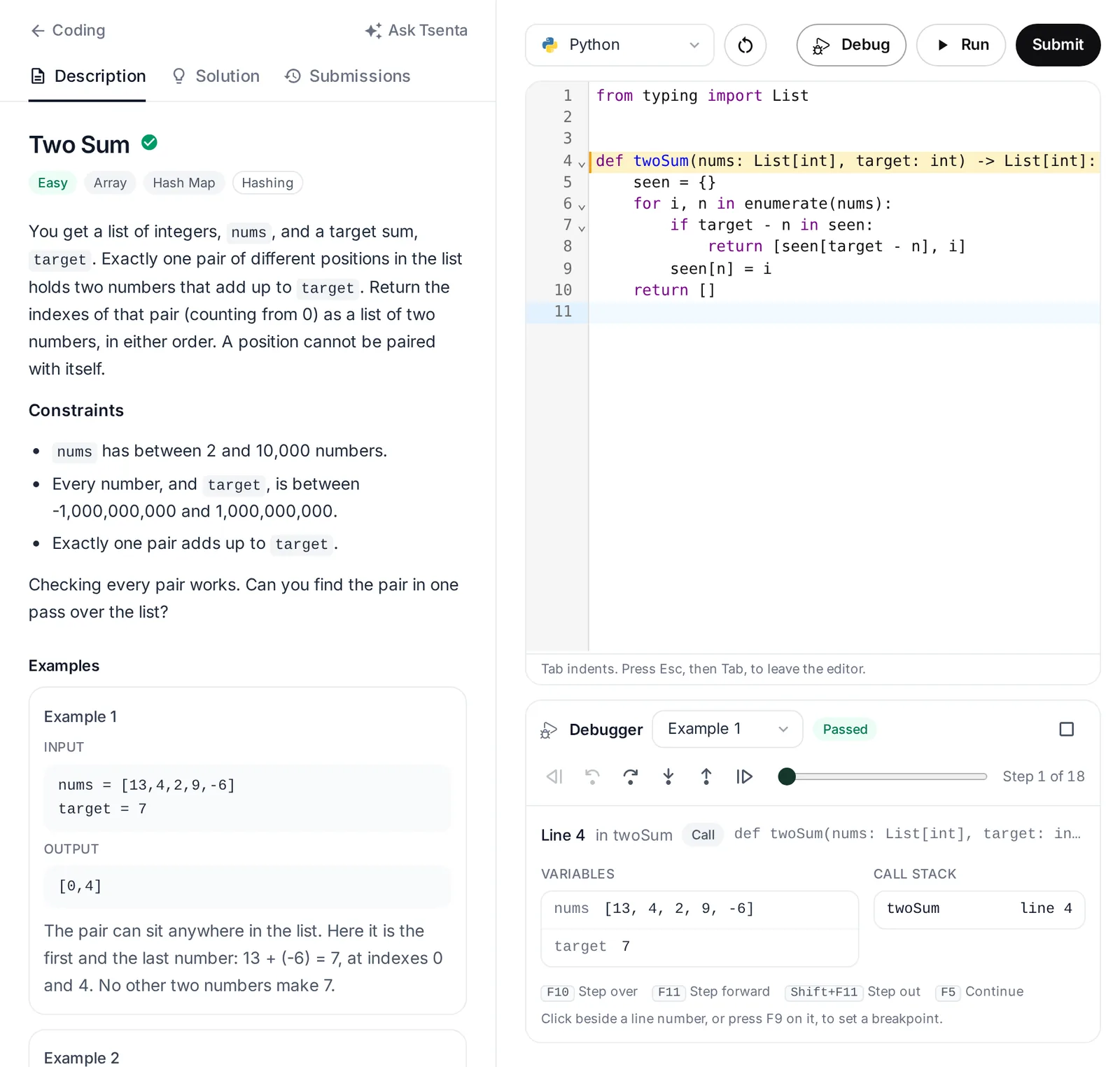
Debug steps through one example's run line by line, forward and back, in every one of the eight languages. You can step over, into and out of calls, set breakpoints, watch the variables with changes marked, and see the call stack and the output so far. Real coding interviews rarely give you a debugger, so use it to see why a case fails, then practice tracing the same code by hand.
The Solution tab holds Tsenta's own editorial, with the approach, the key idea, the steps and the time and space complexity, plus a reference solution in your language. It stays behind one Show solution button until you want it. The Submissions tab saves your recent submits with their code, so you can load one back into the editor.
Coding interview practice with AI hints before answers
The Tsenta assistant in the dashboard sidebar reads the problem, your code and your last run. It coaches with hints before answers and gives a full solution only when you ask for one. It can also open a company's questions, a mock interview or system design for you.
Tsenta is built for practice before an interview and feedback after it, and it does not join, listen to or record your interviews. To practice talking through technical questions out loud, try a technical round mock interview. It asks 6 questions in about 40 minutes and follows up when an answer is missing your own action, a result or a number.
More practice for the same interviews
- System designSystem design interview practiceA 20-lesson animated Learn course and 100 classic prompts, each in a 45-minute workspace with a whiteboard and a reference design to check your board against.See system design practice
- FeedbackFeedback on a real interviewAfter the round, add the transcript and see each answer scored on structure, specifics, relevance and length, with a stronger way to say it.See interview feedback
- CompanyAmazon coding interview questionsThe difficulty mix and top topics of the questions linked to Amazon on public, community-kept lists, and how to practice before your Amazon round.Read the Amazon page
- CompanyMeta coding interview questionsWhat the questions linked to Meta on public, community-kept lists test, and how Tsenta builds practice around your Meta round, from coding to a mock interview.Read the Meta page
- CompanyMicrosoft coding interview questionsWhat Microsoft says about its 45-minute technical round and its rule on AI tools, and what the questions linked to Microsoft on public lists test.Read the Microsoft page
- CompanyUber coding interview questionsWhat Uber's own interview guide says about each round, and how graphs stand out among the questions linked to Uber on public lists.Read the Uber page
Coding interview practice questions
Get ready for your next coding round
Connect your job email, and the companies of your upcoming interviews come first in Coding.