
System design interview practice: a course, 100 prompts and a timed whiteboard
Tsenta's System design section (Beta) lets you practice system design interviews on 100 classic prompts in a 45-minute whiteboard workspace, then check your board against Tsenta's reference design and a rubric. If you need the basics first, its 20-lesson course grows one link shortener, Snip, from a single server to many regions, with a short animation in each lesson showing the click travelling the system you just changed.
Tsenta's System design section is for people in tech roles with a system design round coming up. It runs in the Tsenta dashboard on the web, in the same account where Tsenta applies to jobs for you.
- 20
- lessons in 7 units, about 10 minutes each
- 100
- classic system design prompts in 8 groups
- 42
- concept cards, searchable in their own tab
- 45 min
- on the clock in each practice workspace
How to prepare for a system design interview with Tsenta
- Step 1
Take the placement check
The placement check skips the parts of Learn you already know, so you start where your gaps are.
- Step 2
Learn the rest, or take the crash course
Work through the 20 lessons in order, press Play on each scene and change Snip on the whiteboard, or take the crash course if the round is close. Concepts is there whenever you want the idea on its own.
- Step 3
Practice prompts on the clock
Open one of the 100 prompts, ask clarifying questions, pick a twist if you want one and draw your design in 45 minutes.
- Step 4
Review against the reference design
Check your board against Tsenta's design and the rubric, read the follow-ups and study the concepts behind what you missed.
- Step 5
Get feedback on the real round
After the interview, add its transcript in Feedback to see how each answer landed and what to prepare before the next round. Only you can see that feedback.
Learn system design as one story, from one server to many regions
Learn is a 20-lesson course in 7 units, and every lesson is about 10 minutes. It grows one link shortener, Snip, from a single server to many regions, one real problem at a time. Each lesson adds a piece only when a problem calls for it, so a cache or a queue arrives with the problem it solves, not as a term to memorize.
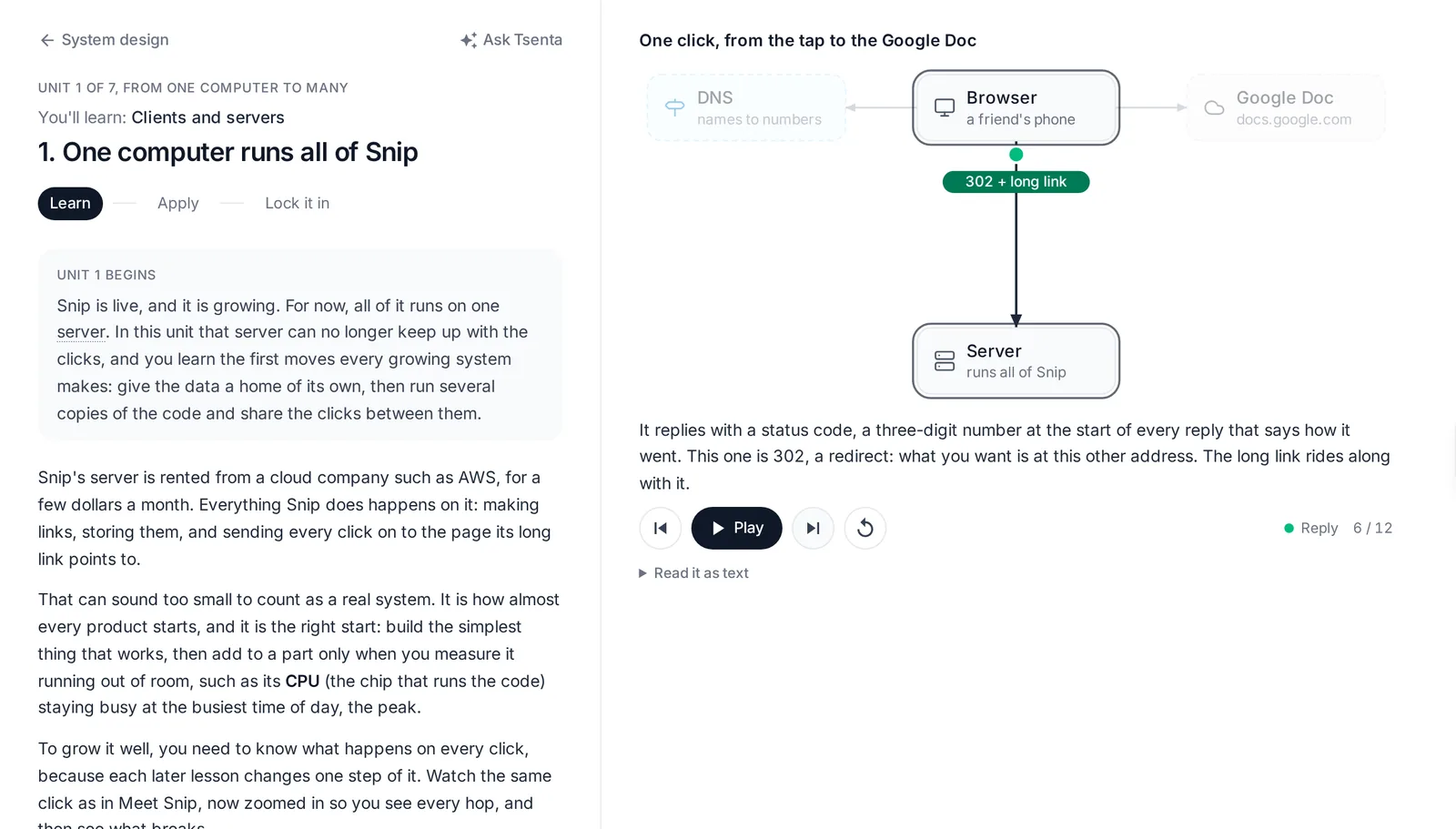
A lesson sits in two columns: the explanation on one side, Snip's board on the other, where a short scene plays a click travelling the system you are about to change. Every lesson ends with a check question, and the ones you miss come back as spaced review after 1, 3, 7, 16 and 35 days.
- A scene you press play on
- Each lesson opens with what just happened to Snip, then plays a click travelling the board beside it, step by step. Read it as text instead, and it holds still if your system asks for reduced motion.
- Plain words first
- The idea is explained plainly, with the interview depth folded underneath for when you want it.
- Your turn on the whiteboard
- You change Snip on a whiteboard while a tutor asks questions, with a strong answer and our drawing to reveal when you want to compare.
A searchable reference of 42 system design concepts
Concepts sits beside Learn and Practice as its own tab: 42 cards, one per idea, grouped by unit and searched with one box. Caching, sharding, consistent hashing, leader election and the rest each get a page with a diagram and the trade-offs.
A term the course defines gets a popover wherever it appears later, and every popover links to its card. Reviews after a practice prompt link to the cards behind the rubric points you left unticked, so what to study next is never a guess.
System design for beginners, and a crash course before the interview
You do not have to start at the first lesson. Someone new to system design follows the whole story, and someone who already runs services can take the placement check and skip the lessons it shows they know.
If your round is days away, take the crash course. It keeps only the lessons that matter most before an interview, so more of your time goes to timed prompts in Practice.
System design interview questions: 100 prompts in eight groups
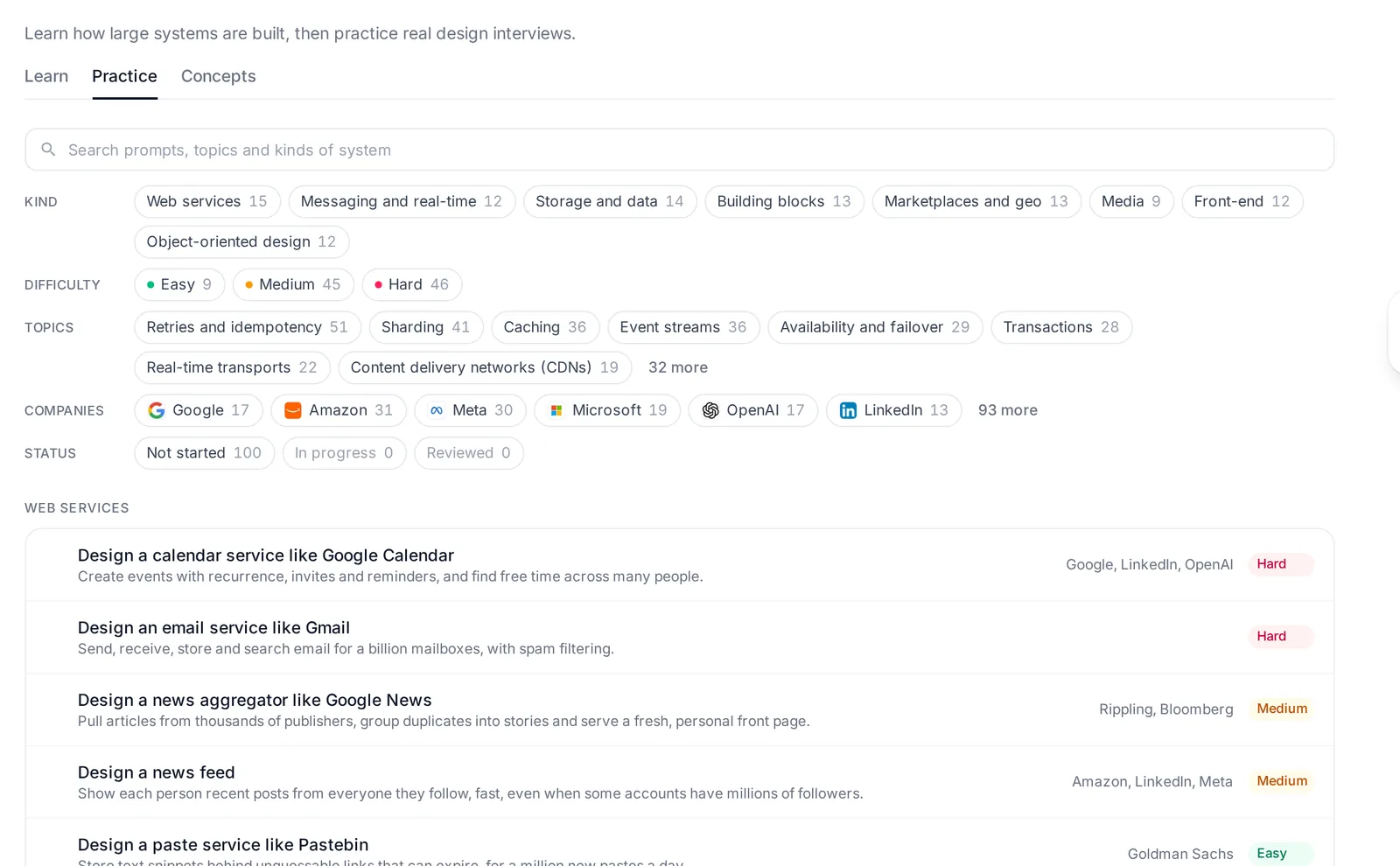
Practice holds 100 classic prompts, such as a URL shortener, a news feed and a chat app. They sit in eight groups: web services, messaging and real-time, storage and data, building blocks, marketplaces and geo, media, front-end, and object-oriented design.
Search the library, or filter it by group, difficulty, company and status. A company tag appears only where a source names that company.
A system design mock interview you run yourself, on a timed whiteboard
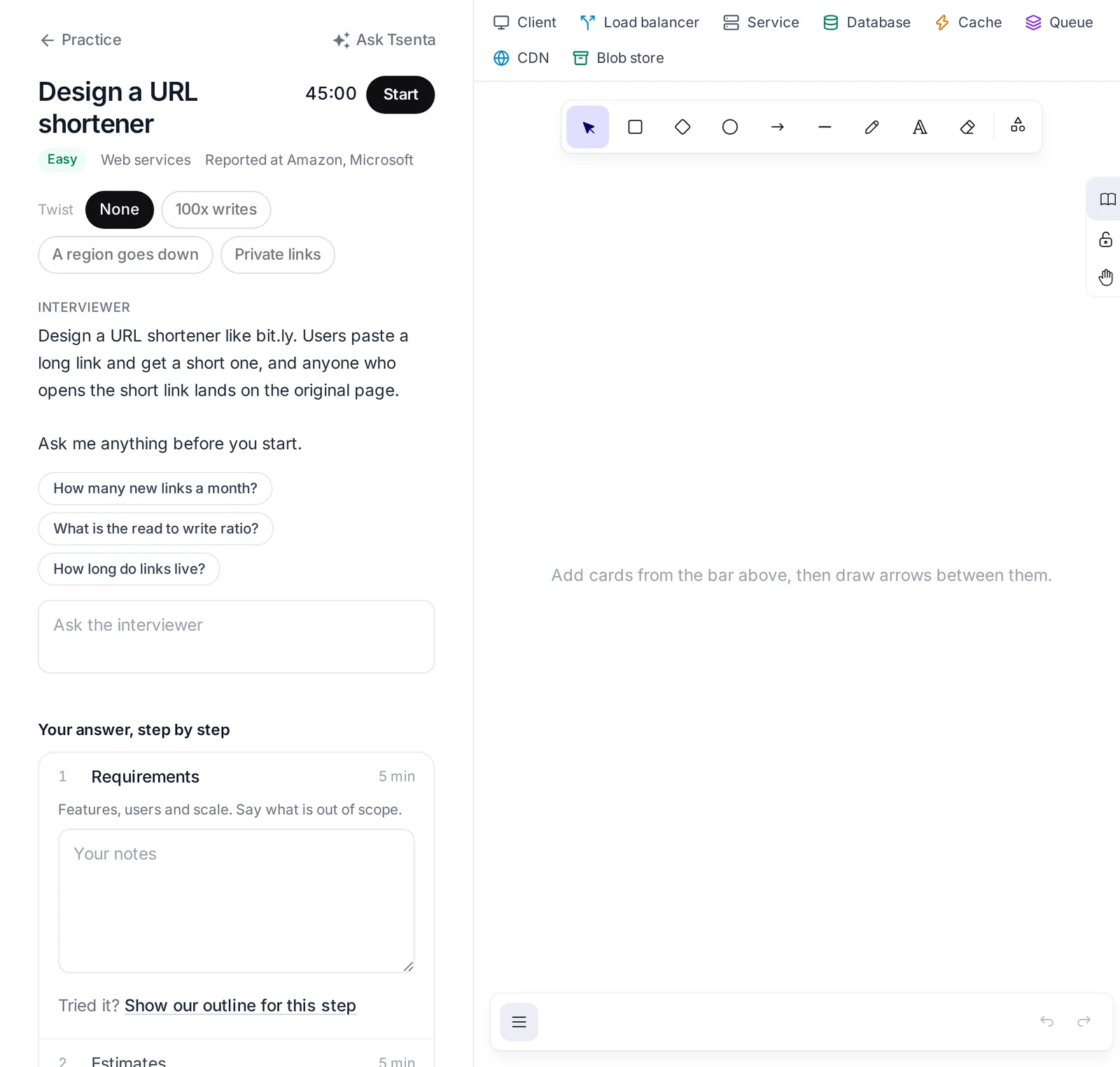
Open a prompt and you see the interviewer's prompt and the steps in order. Press Start and the 45:00 clock begins, so you practice getting to a finished design in time.
Ask clarifying questions and the interviewer answers with the numbers a candidate should ask for. In a URL shortener, that means how many new links a month, the read to write ratio and how long links live.
- Twists
- Pick an optional twist to change the problem, such as a jump in writes or a region going down.
- Steps with notes
- Work through the steps in order, with notes for each. In a URL shortener, the first three are requirements, estimates, and the API and data model, at about 5 minutes each.
- Whiteboard
- Add cards for a client, load balancer, service, database, cache, queue, CDN and blob store, and draw your design.
Check your design against a reference design and a rubric
When you finish, you review your own work. Go down the rubric and check off each point your board covers, and what stays unchecked is what you left out.
You never have to wait for the answer. Show our outline reveals Tsenta's answer whenever you want it, one step at a time or the whole design, in the workspace as well as in the review.
- Reference design
- Tsenta's design for the prompt, next to your board.
- Rubric
- 6 to 10 points to check yourself against.
- Your notes beside ours
- Tsenta's notes next to yours, step by step.
- Follow-ups
- The questions an interviewer would ask next on this prompt.
- Concepts
- The ideas behind any rubric points you missed, so you know what to study next.
System design interview prep tied to your real interviews
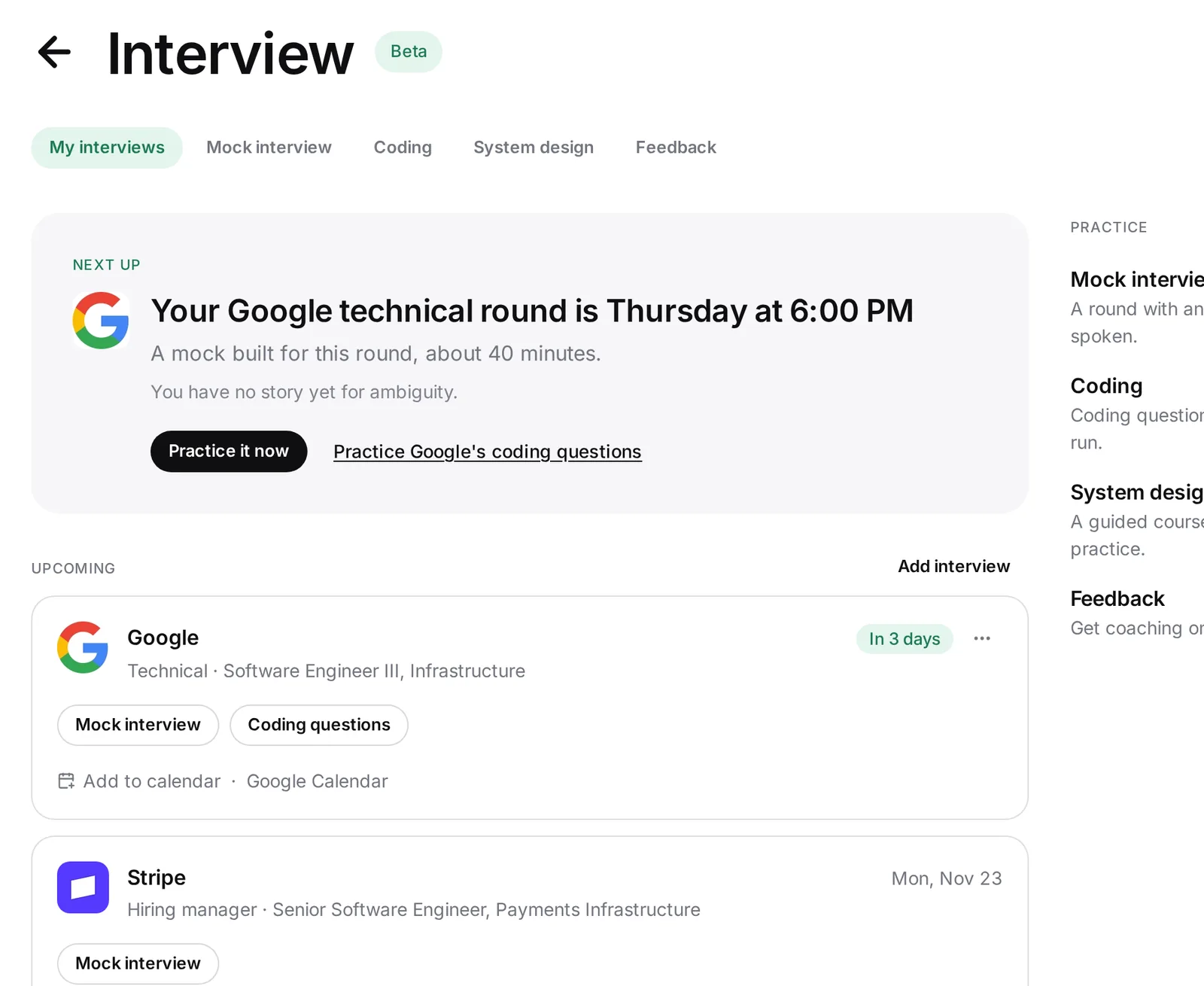
Tsenta reads your upcoming interviews from the job email you connect, and you can add one by hand. My interviews shows each one with the company, role, round and when, so you know how many days you have before a design round.
Before a system design round, filter the library by that company where a tag exists and run a prompt or two on the clock. Then open the Mock interview built for that interview, a separate practice round of questions you answer by typing or speaking, with no whiteboard. After the real round, Add transcript gives you private feedback on how it went, and Prep for the next round builds a mock interview around that feedback.
The Tsenta assistant in the dashboard sidebar can open system design for you. Ask it for a mock interview or a company's coding questions and it opens those too.
Practice the other rounds too
- CodingCoding interview practice3,400+ problems drawn from public, community-kept lists of the questions 650+ companies ask, in eight languages plus SQL.See Coding
- Mock interviewA mock interview for your real roundA practice round built from your interview's company, role and round, answered out loud or typed, with a report on each answer.See Mock interview
- FeedbackFeedback on a real interviewAdd a transcript from Zoom, Google Meet, Otter or a similar notetaker and get private feedback on each answer.See Feedback
System design interview practice: common questions
Learn the basics, then design against the clock
Start with the placement check, meet Snip in lesson one, or open a prompt and press Start on its 45-minute timer.