
AI interview feedback on the interview you just had
Tsenta is an AI interview feedback tool that scores each answer from a real interview you already had and shows a stronger way to say it. Tsenta works from a Zoom, Google Meet or Otter transcript, or a recap you paste with the speakers labeled, and its private feedback says what to prepare before your next round.
Feedback is one of the five sections of Interview prep in the Tsenta dashboard on the web, and it is open to every Tsenta account. Feedback starts once the interview is over, from the transcript or recap you add.
- 4 scores
- on every answer: structure, specifics, relevance and length
- 5 file types
- .txt, .vtt, .srt, .docx and .pdf, or text you paste
- Only you
- can see the feedback on your transcript
How interview transcript review works
- Step 1
Pick the interview
Pick the interview from My interviews, where Tsenta lists the interviews it read from your job email and the ones you added, or describe it. After an interview, its card in My interviews also has an Add transcript button.
- Step 2
Add the transcript
Upload the export from Zoom, Google Meet, Otter or a similar notetaker as a .txt, .vtt, .srt, .docx or .pdf file up to 5 MB, or paste the text. Without a recording, write a recap of each question and your answer with the speakers labeled, for example Interviewer and Me, and paste that. A transcript needs at least two speakers and six turns.
- Step 3
Say which speaker is you
Choose which speaker label is you, so every score is about your answers and not the interviewer's. Talk share, answer length and filler words are counted for that speaker too.
- Step 4
Read the feedback and practice the next round
Read the short version and what to prepare before your next round first, then each answer with its scores. If your account has the Interview tab, Practice the next round sets up a mock of the round that comes next, built around that feedback.
What your AI interview review shows
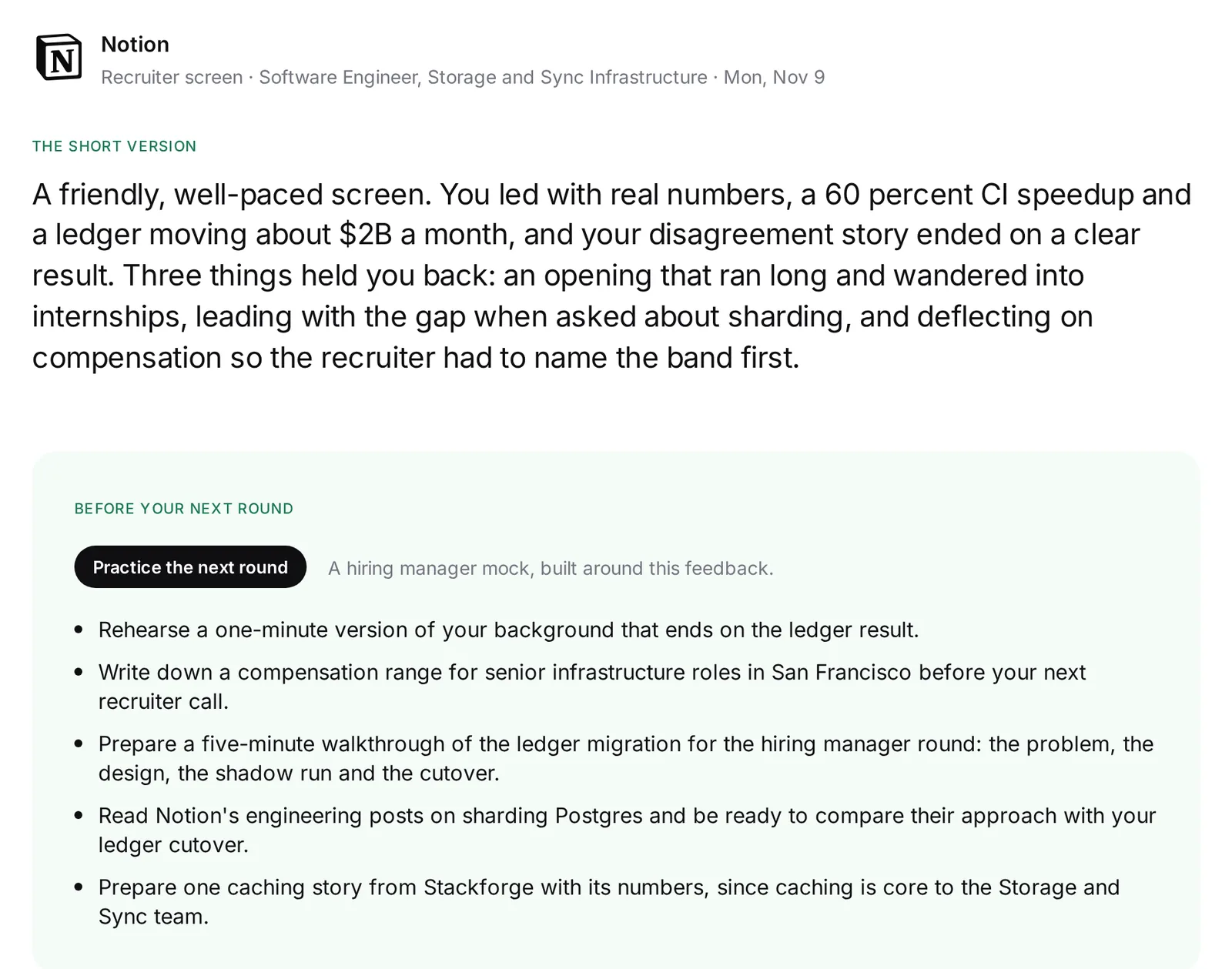
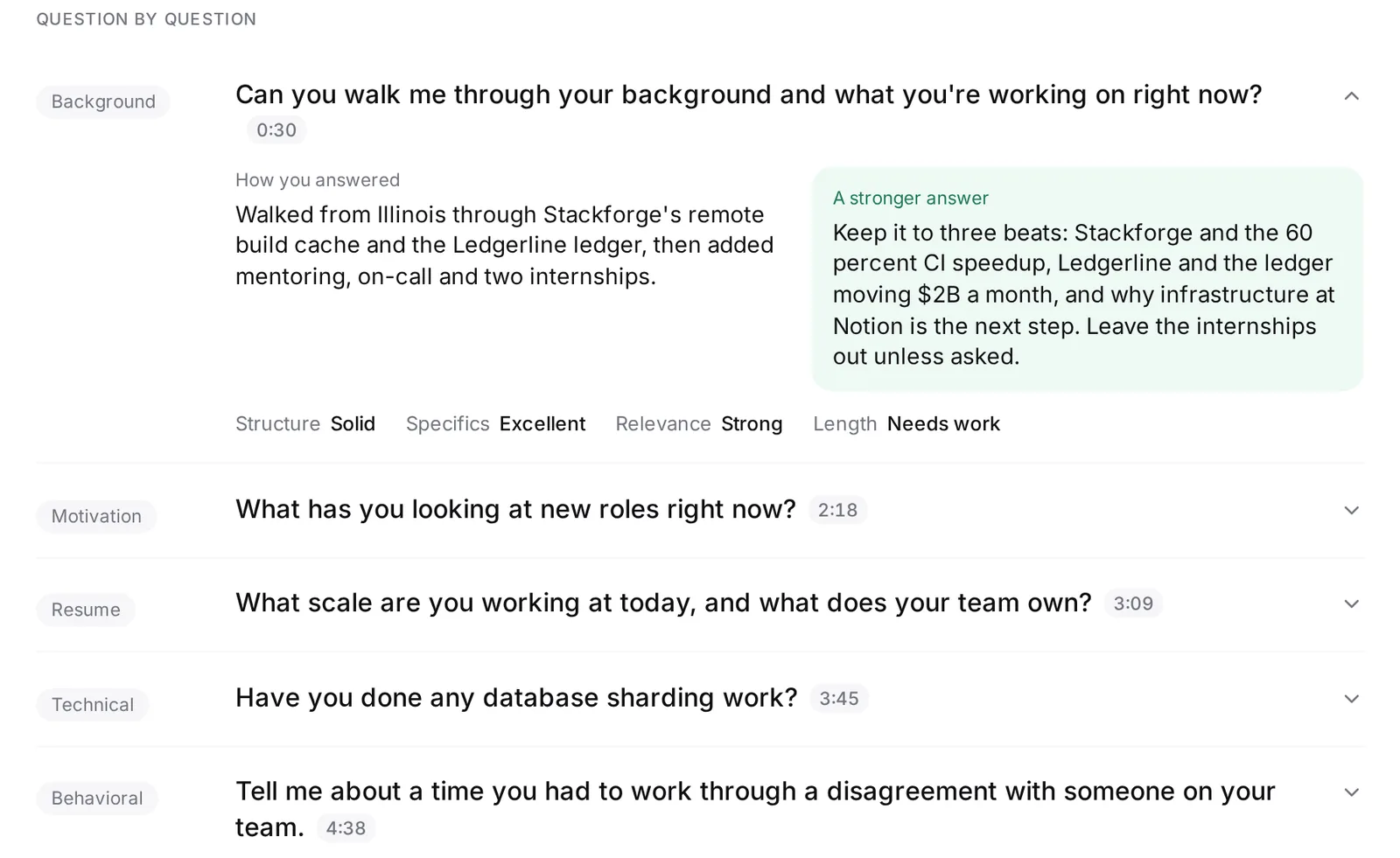
Feedback opens with the short version of how the interview went and, right under it, what to prepare before your next round. Each answer is rated on structure, specifics, relevance and length, with labels such as Excellent, Strong, Solid and Needs work. That shows which answers held up and which ran long or stayed vague.
- The short version
- A short paragraph on how the interview went.
- Before your next round
- Concrete things to prepare, such as a shorter version of your background or a story told with its numbers.
- What landed and what to tighten
- The moments that worked, and the ones to fix before the next round.
- Question by question
- What you were asked, how you answered, the four scores and a stronger way to say it.
- Job fit
- How well you covered what the job asks for, when Tsenta has the job description for the posting.
Interview transcript analysis: talk share, pace and filler words
Beside the coaching, Tsenta counts a few delivery numbers straight from the transcript instead of guessing them. They are a nudge, not a verdict, so read them next to the feedback on each answer.
- Talk share
- How much of the conversation was you and how much was the interviewer.
- Answer length
- Your average answer and your longest one.
- Words per minute
- Your pace, when the transcript has timestamps.
- Filler words
- How often fillers such as um and uh came up.
- Your questions
- The questions you asked the interviewer at the end.
From interview feedback to a mock of your next round
When your account has the Interview tab, Practice the next round turns your feedback into a mock interview of the round that comes next, built around what the feedback said to work on. After a recruiter screen, for example, it can be a hiring manager mock.
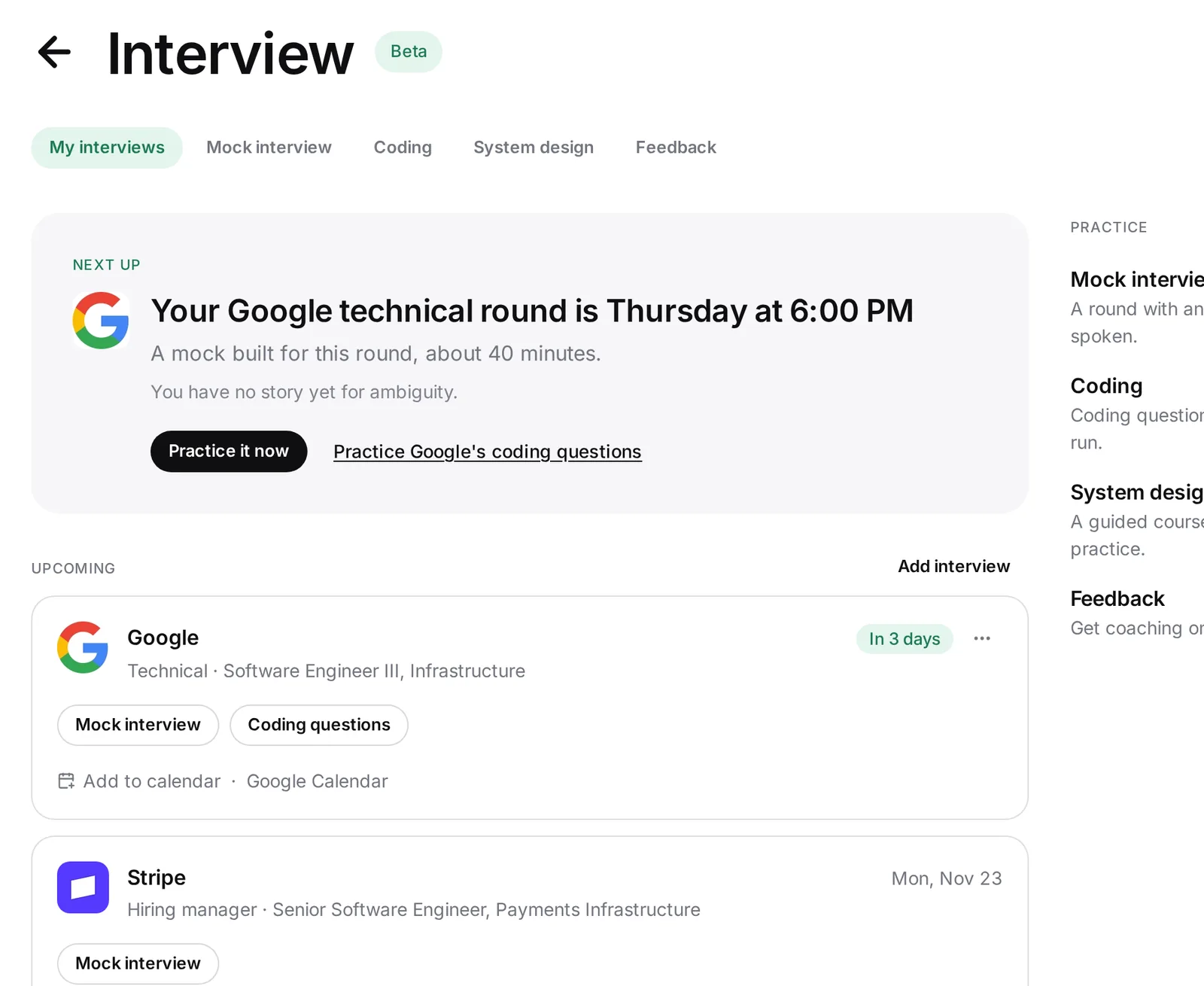
Tsenta reads your upcoming and past interviews from the job email you connect, the same inbox it uses to track your applications. Each interview gets a card in My interviews, with Mock interview before it and Add transcript, View feedback and Prep for the next round after it. You can add an interview by hand too.
Private feedback, and recording a job interview with permission
Nothing from your transcript or its feedback is shared with employers or other users, and the feedback draws only on your own data, never anyone else's. Tsenta keeps the text it extracts from your file, not the file itself.
Ask the interviewer before you record a call or start a notetaker. Some places require everyone on a call to agree before it is recorded, so asking first is the safe habit wherever you both are. If the answer is no, take notes during the call and write your recap right after.
Why did I fail my interview? What a transcript can and cannot show
Feedback reads patterns in what you said: an opening that ran long, a story without a result, an answer that drifted from the question. Those patterns are yours to fix before the next round.
Feedback cannot tell you why a company decided what it did, since the hiring team's reasons are not in the transcript. A strong score is not an offer, and a weak one is not a rejection.
Tsenta is built for practice before an interview and feedback after one. It does not join, listen to or record your interviews, and it is not a human coach.
More ways to get ready for the next round
- Mock interviewAI mock interview for your next roundAn AI practice interviewer built from your real interview, with the same four scores on every answer and a STAR check on behavioral ones.See mock interviews
- Tech rolesCoding interview practice3,400+ interview problems drawn from public, community-kept lists of the questions 650+ companies ask, in eight languages plus SQL. Your code runs in an isolated sandbox.See coding practice
- Tech rolesSystem design interview practiceA 20-lesson animated course that grows one link shortener from a single server to many regions, and 100 practice prompts in a 45-minute workspace.See system design
Questions about AI interview feedback
Turn your last interview into practice for the next
Add a transcript or a written recap in the Tsenta dashboard to get each answer scored, then practice your next round in the Interview tab with a mock built around the feedback.