
Best Free Job Application Tracker Apps in 2026 (No Spreadsheets Needed)
The best free job application tracker apps in 2026 are Tsenta, Teal, Simplify, Huntr, Jobright, Careerflow and JibberJobber. Here is what each free plan includes, where it caps you, and which ones also apply for you.
The best free job application tracker apps in 2026 are Tsenta, Teal, Simplify, Huntr, Jobright, Careerflow and JibberJobber, and every one of them puts a limit somewhere on its free plan. Teal tracks unlimited jobs for free, Huntr caps you at 100, Simplify's free tracker logs what you submit through its extension and reads Gmail, and Tsenta pairs its tracker with an agent that submits your first 25 applications for free.
This guide compares free plans only: how many jobs you can track, whether the tracker syncs with your email, what the Chrome extension does, and whether the tool also applies for you. If you want the follow-up and interview angle instead, read our guide to job trackers that help you land interviews faster.
Quick picks:
- Best free tracker that also applies: Tsenta
- Best unlimited free manual tracker: Teal
- Best free email sync: Simplify
- Best free kanban board: Huntr
- Best for job discovery plus tracking: Jobright
- Best for LinkedIn profile work: Careerflow
- Best for networking-heavy searches: JibberJobber
What Is a Job Application Tracker App?
A job application tracker app replaces the spreadsheet you would otherwise keep: company, role, date applied, status, contacts, notes and follow-ups. The useful ones go further and update themselves. They capture a job from the posting with a browser extension, log an application when you submit it, or read the reply from the recruiter and move the status for you.
That last part is what separates trackers in 2026. A tracker you update by hand is a nicer spreadsheet. A tracker that fills itself saves real time once you are applying to more than a handful of roles a week.
What to Check on a Free Tracker Plan
Free plans differ more than their landing pages suggest. These are the limits worth checking before you put a month of applications into one.
- Job cap. Some free plans track unlimited jobs. Others stop at 100, or say "limited" without a number. Know where the wall is before you hit it mid-search.
- Email sync. Most trackers only know what you tell them. A few read application mail and suggest or make status changes, which is what keeps a tracker accurate at volume.
- Chrome extension. Extensions range from saving a job posting to autofilling the application form. Check which one you are getting.
- Whether it applies. Autofill fills fields while you click through and submit. An application agent submits the application itself. Very few free plans include the second.
- Getting your data in and out. If you already have a spreadsheet, import matters. If you might switch tools, so does export.
- Mobile. If you check your search between classes or on a commute, a native app beats a mobile browser.
Free Plan Comparison: Job Application Trackers in 2026
Prices and limits below are from each company's own site, checked on October 30, 2026. JibberJobber's site did not load that day, so its row uses its last published terms.
| App | Free tracking limit | Email sync on free plan | Chrome extension | Applies for you | Paid plan |
|---|---|---|---|---|---|
| Tsenta | Tracker on every account; first 25 applications free | Yes, a dedicated Tsenta inbox links replies to the right application; connecting Gmail or Outlook is optional | Sends a role to Tsenta; the application runs in Tsenta's cloud | Yes, the free 25 run end to end on 30+ ATSes | Starter $19 for 600 applications per 30 days |
| Teal | Unlimited job tracking | Not listed (email templates only) | Saves jobs from boards like Indeed, Glassdoor and BuiltIn | No | Teal+ $13/week, $29/30 days, $79/90 days |
| Simplify | Free Job Tracker, no cap published | Yes, Gmail with suggested status changes | Copilot autofill on 100,000+ career sites | Autopilot on Simplify+ only (20 credits a week) | Simplify+ $19.99/week, $39.99/month, $89.99/3 months |
| Huntr | 100 jobs | Not listed | Job Clipper and unlimited autofills | No | Pro $40/month, $90/quarter, $160/6 months |
| Jobright | Applied jobs saved automatically; no cap published | Not mentioned | Free autofill extension | Agent applies for jobs you add, limits depend on plan | Not published on the job seeker pages we checked |
| Careerflow | "Limited," no number published | Not mentioned | Saves jobs and autofills (limited) | No | Premium $23.99/month or $172.99/year |
| JibberJobber | 25 contacts and 25 companies (published terms) | Email2Log is paid | Not listed | No | Premium $60/year (published terms) |
Best Free Job Application Tracker Apps in 2026
1. Tsenta
Tsenta is an AI job application agent with a tracker built in, backed by Y Combinator (S26). It ranks first because it is the only tool in this list whose published free plan includes submitting applications, not just logging them. Your first 25 applications run through the full agent with no card: it finds the role, tailors your résumé and cover letter to it, submits through the employer's own system, and tracks the reply.
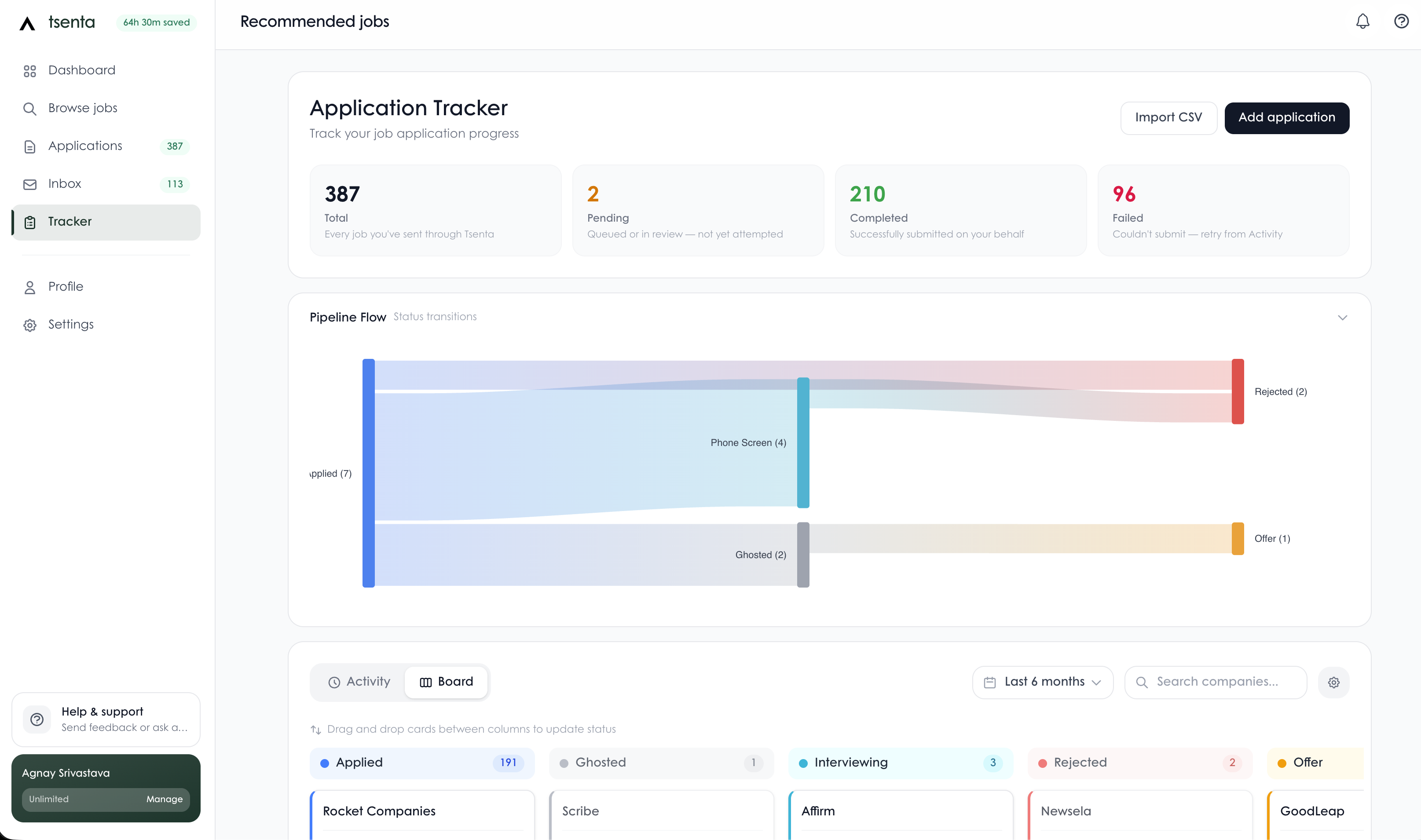
What the tracker does:
- Every application Tsenta submits lands in the tracker on its own, so there is nothing to log.
- Stages cover applied, interviewing, offer, rejected and ghosted. Drag a card or edit a status whenever you hear back.
- Add application logs a role you applied to somewhere else, and Import CSV brings in the spreadsheet you already have.
- Your dedicated Tsenta inbox receives application mail, links each message to its application, and updates the status when the match is clear. You can read, search and reply from the inbox, and correct a status by hand.
- Connecting your own Gmail or Outlook is optional.
Free plan:
- First 25 applications free, no credit card
- The full agent on those 25: role matching from 50,000+ company career pages, per-role résumé tailoring, submission on 30+ ATSes including Workday, Greenhouse, Lever, Ashby and iCIMS, and tracking
- Tracker and inbox included, not an upgrade
Pricing (per 30-day cycle):
- Starter: $19 for 600 applications
- Pro: $39 for 1,500 applications
- Power: $99 for 4,500 applications, with Auto Apply
- Only successful submissions count. Quarterly and annual billing lower the effective monthly rate by up to 36%.
Pros:
- The tracker fills itself from the applications Tsenta submits and the replies that come back
- Submits the application itself, through the employer's own system, including Workday
- Résumé tailoring on every plan, with a diff to approve when résumé review is on
- Web dashboard, native iOS and Android apps, iMessage, WhatsApp, a Chrome extension and an MCP server for Claude and ChatGPT
- Imports your existing spreadsheet
Cons:
- The free tier is 25 applications in total, not a monthly refill
- No résumé score or keyword report
- Fully automatic Auto Apply requires the Power plan
- If you only want to log applications you submit yourself, Teal is simpler
Best for: anyone who wants the tracker and the applying handled in one place, especially at volume.
2. Teal
Teal is the strongest free manual tracker in this list. Its free plan lists unlimited job tracking and unlimited résumés, and Teal says its tracker is loved by over 4 million members. The Chrome extension saves postings from job boards such as Indeed, Glassdoor and BuiltIn into your tracker, with ratings and notes, and the tracker includes a spreadsheet view, contacts, checklists and email templates for each stage.
Free plan:
- Unlimited job tracking and unlimited résumés
- 10 résumé templates
- Top 5 keywords from each job description
- Basic résumé analysis
- 1 email template per job stage
- AI credits: 5 for résumé bullets, 2 for summaries, 2 for cover letters
Pricing: Teal+ is $13 every 7 days, $29 every 30 days, or $79 every 90 days. Teal says no credit card is required to start.
Pros:
- No job cap on the free plan
- A full job search CRM: contacts, notes, excitement ratings, checklists
- Spreadsheet view for people who like columns
Cons:
- You update statuses yourself; Teal's pages describe email templates, not inbox sync
- Does not submit applications
- AI help on the free plan is a handful of credits
Best for: a manual search of any size where you want everything organized for free.
3. Simplify
Simplify's free plan does more tracking work for you than most. Its Copilot extension autofills applications on 100,000+ company career sites, and the Job Tracker updates as you apply with Simplify. Its help center says basic Copilot autofill, the Resume Builder, the Job Tracker and Gmail integration are all available without Simplify+.
Free plan:
- Copilot autofill: it fills supported fields and you review and submit
- Job Tracker that updates as you apply through Simplify
- Gmail integration: matched recruiting conversations, sending messages, and suggested status changes you approve or decline
- Resume Builder
Pricing: Simplify+ is $19.99 a week, $39.99 a month, or $89.99 for three months. It adds AI tailoring, cover letters, AI email drafting and Autopilot.
Autopilot: on Simplify+, Autopilot fills and submits supported applications without a review step. Simplify+ includes 20 Autopilot credits a week, a credit is used only for a successful submission, and unused credits do not roll over.
Pros:
- Free Gmail sync, which no other manual tracker in this list offers
- Tracker logs what you submit through Copilot without retyping
- Simplify reports 2 million+ job seekers and a 4.9/5 Chrome Web Store rating for Copilot
Cons:
- Gmail updates are suggestions you approve, not automatic
- Submitting for you (Autopilot) is paid, with 20 credits a week included
- On the free plan you still click through and submit every application
Best for: a high-volume manual search where you want the tracker to fill itself as you go.
4. Huntr
Huntr is a kanban-style tracker with a browser extension for saving jobs and autofilling forms. Its free plan is clear about its limits, which we appreciate.
Free plan:
- Track up to 100 jobs
- Chrome Job Clipper and unlimited application autofills
- Unlimited base résumés, 2 job-tailored résumés and 2 application packets
- Up to 100 document uploads
- Unlimited contact management, map view, basic résumé matching and scoring
- A small number of AI credits, and no ads
Pricing: Huntr Pro is $40 a month, $90 every 3 months ($30 a month), or $160 every 6 months ($26.66 a month). Huntr says there is no free trial of Pro.
Pros:
- Clean kanban board for seeing a search at a glance
- 100 jobs is enough for a focused search
- Unlimited autofills on the free plan
Cons:
- The 100-job cap arrives fast in a broad search
- No inbox sync listed on its pricing page, so statuses are on you
- Does not submit applications
Best for: a focused search of under 100 roles where you like a visual board. We compare it with Tsenta in detail in Tsenta vs Huntr.
5. Jobright
Jobright is a job discovery platform first, with tracking attached. Every job you apply to through Jobright is saved to your applied list automatically, and you can upload outside jobs too. Statuses run from Applied to Interviewing, Offer Received, Rejected and Archived. Jobright's tracker page counts 8,000,000+ jobs, with 400,000+ new ones the day we checked.
Free plan: the autofill extension is offered free, and personalized matches need a free account. Jobright's job seeker pages we checked do not list plan prices or a tracking cap.
Applying for you: Jobright's Agent works through the application for jobs you add, and Jobright notes that adding a job is not the same as approving every completed form. Access and usage limits depend on your account and plan.
Pros:
- Tracking happens automatically for jobs you apply to through Jobright
- Large job feed with matching
- H-1B labels that separate postings that state sponsorship from companies that are only likely to sponsor
Cons:
- Job seeker pricing and limits are not published on the pages we checked
- No email sync mentioned
- Outside applications still need to be added by hand
Best for: people who find most of their jobs in Jobright and want the tracking to follow.
6. Careerflow
Careerflow bundles a tracker with LinkedIn profile tools and a Chrome extension that saves jobs and autofills applications. Its free plan doesn't put numbers on its limits: the tracker and autofill are both marked "limited," and the pricing table adds "Will be limited soon."
Free plan:
- Job Application Tracker (limited)
- 1 résumé with basic features
- Job Application Autofill (limited)
- LinkedIn Optimizer (basic)
- Chrome extension
Pricing: Premium is $8.99 a week, $23.99 a month, $54.99 a quarter, or $172.99 a year ($14.41 a month). Premium Plus is $44.99 a month.
Pros:
- LinkedIn profile help on the free plan
- Extension saves jobs from sites such as LinkedIn and Indeed
- Networking tracker alongside the job tracker
Cons:
- Free limits are not published as numbers
- No email sync mentioned
- Does not submit applications
Best for: job seekers who want LinkedIn optimization and light tracking together. See also Tsenta vs Careerflow.
7. JibberJobber
JibberJobber is a job search CRM: target companies, contacts, recruiters, jobs and follow-ups in one place. It suits a networking-led search more than a high-volume one. Its site did not load when we checked on October 30, 2026, so the details below are its last published terms and worth confirming before you sign up.
Free plan (published terms): a free-for-life account limited to 25 contacts and 25 companies.
Pricing (published terms): Premium at $60 a year, which removes those limits and adds Email2Log (BCC an address to log an email) and reminder notifications.
Pros:
- Built around relationships and follow-ups
- Simple pricing: one free tier and one paid tier
Cons:
- 25 contacts and 25 companies is a hard ceiling for an active search
- We found no extension, autofill or applying in its published terms
- Email logging is paid
Best for: referral-driven searches with a short target list.
Best Tool to Track Job Applications: The Practical Answer
"What do you use to track applications?" comes up again and again in job search communities like Reddit, and the answers range from Notion to a paper notebook. The honest answer depends on volume.
- Under 20 applications a week: a free manual tracker is plenty. Teal if you want no cap, Huntr if you like a board and will stay under 100 jobs.
- 20 to 100 a week: manual updates start to slip. Pick a tracker that fills itself. Simplify logs what you submit through Copilot and suggests status changes from Gmail.
- More than that, or on a deadline like an OPT clock: the tracking is no longer the hard part, the applying is. Use a tool that submits and tracks in one place. Tsenta's free 25 applications are a fair test of whether that works on the employers you target.
Whatever you pick, keep one source of truth. Two trackers drift apart fast.
How We Evaluated These Free Trackers
We scored each free plan on what it gives you before you pay:
- Free tracking limit (25%): is there a cap, and is it published?
- Automatic updates (25%): does the tracker log applications and read replies, or do you type every change?
- Applying (20%): does the tool submit applications, and is that on the free plan?
- Capture (15%): how good is the extension at getting a job or an application in without retyping?
- Data in and out (10%): can you import an existing spreadsheet or move off later?
- Mobile (5%): is there a native app?
Teal wins on free tracking limit. Simplify wins on free email sync. Tsenta wins on automatic updates and applying, and it is the only one whose published free plan submits applications, which is why it ranks first overall.
Why Tsenta Ranks First
Every other tool here mainly helps you organize applications you send yourself. Simplify sells applying as part of Simplify+ with a weekly credit allowance, and Jobright's Agent has limits that depend on your plan. Tsenta starts from the other end. The agent finds roles across 50,000+ company career pages, tailors your résumé per role, submits the full application on 30+ ATSes, and the tracker fills in as it goes. Recruiter replies route back to the right application, and you can still add roles you applied to elsewhere or import your old spreadsheet.
The free plan is 25 applications with no card, which is enough to see whether it works on the companies you care about. After that, Starter is $19 for 600 applications per 30-day cycle. If you are comparing free options beyond trackers, see our guide to the best free app for job applications.
FAQs About Free Job Application Tracker Apps
What is the best free job application tracker app in 2026?
It depends on whether you want a tracker or a tracker that also applies. Teal is the best free manual tracker, with unlimited job tracking on its free plan. Simplify's free plan logs what you submit through its Copilot extension and connects Gmail to suggest status changes. Huntr's free plan gives you a kanban board for up to 100 jobs. Tsenta ranks first in this guide because its tracker comes with an agent that submits your first 25 applications for free, with no card, and routes recruiter replies back to the right application.
Which free job tracker has no job cap?
Teal's free plan lists unlimited job tracking. Huntr's free plan caps you at 100 tracked jobs. Careerflow labels its free tracker as limited without publishing a number. JibberJobber's published free terms cap you at 25 contacts and 25 companies. Simplify and Jobright do not publish a tracking cap on the pages we checked.
Which free job trackers sync with your email?
Simplify connects Gmail on its free plan: it shows matched recruiting conversations and suggests tracker status changes that you approve or decline. Tsenta gives every account a dedicated inbox for application mail, links messages to the right application, and updates the status when the match is clear; connecting your own Gmail or Outlook is optional. Teal, Huntr, Careerflow and Jobright do not list inbox sync on the pages we checked, and JibberJobber's email logging (Email2Log) is a paid feature.
Do any free job trackers also apply to jobs for you?
Tsenta is the only tool here whose published free plan includes submitting applications: your first 25 applications run through the full agent, which tailors your résumé, submits through the employer's own system and tracks the reply. Simplify's Autopilot submits without a review step, but it requires Simplify+ and includes 20 credits a week. Jobright's Agent can apply for jobs you add, with access and limits that depend on your plan and are not published on the pages we checked. Teal, Huntr, Careerflow and JibberJobber help you organize or autofill, and you still submit yourself.
What is the best tool to track job applications if you apply to a lot of jobs?
If you apply to more than a few dozen roles a week, manual status updates become the bottleneck. A tracker that fills itself is the better fit: Simplify logs what you submit through its extension, and Tsenta logs every application it submits, routes recruiter replies to the right one and lets you add or import roles you applied to elsewhere. For a lower-volume search where you want full control, Teal's free plan is hard to beat.
Is a spreadsheet still a good way to track job applications?
A spreadsheet works for a small, focused search. It breaks down when you apply widely, because every status change, recruiter email and follow-up date has to be typed in by hand. If you already have one, you do not have to start over: Tsenta's tracker can import a CSV, and Teal offers a spreadsheet view inside its tracker.